01
Continuous outside view
A live 360° panorama of runways, taxiways and apron areas forms the base layer of the workspace. The operator turns their head instead of switching a camera.

Platform
A remote tower moves the outside view away from the airport. VisionATS moves the working position itself into software, so that the operator is tied neither to a tower nor to a control room.
Beyond the remote tower centre
In a conventional remote tower centre the outside view is transmitted to a room full of screens. The room, the display wall and the console remain — only their address changes.
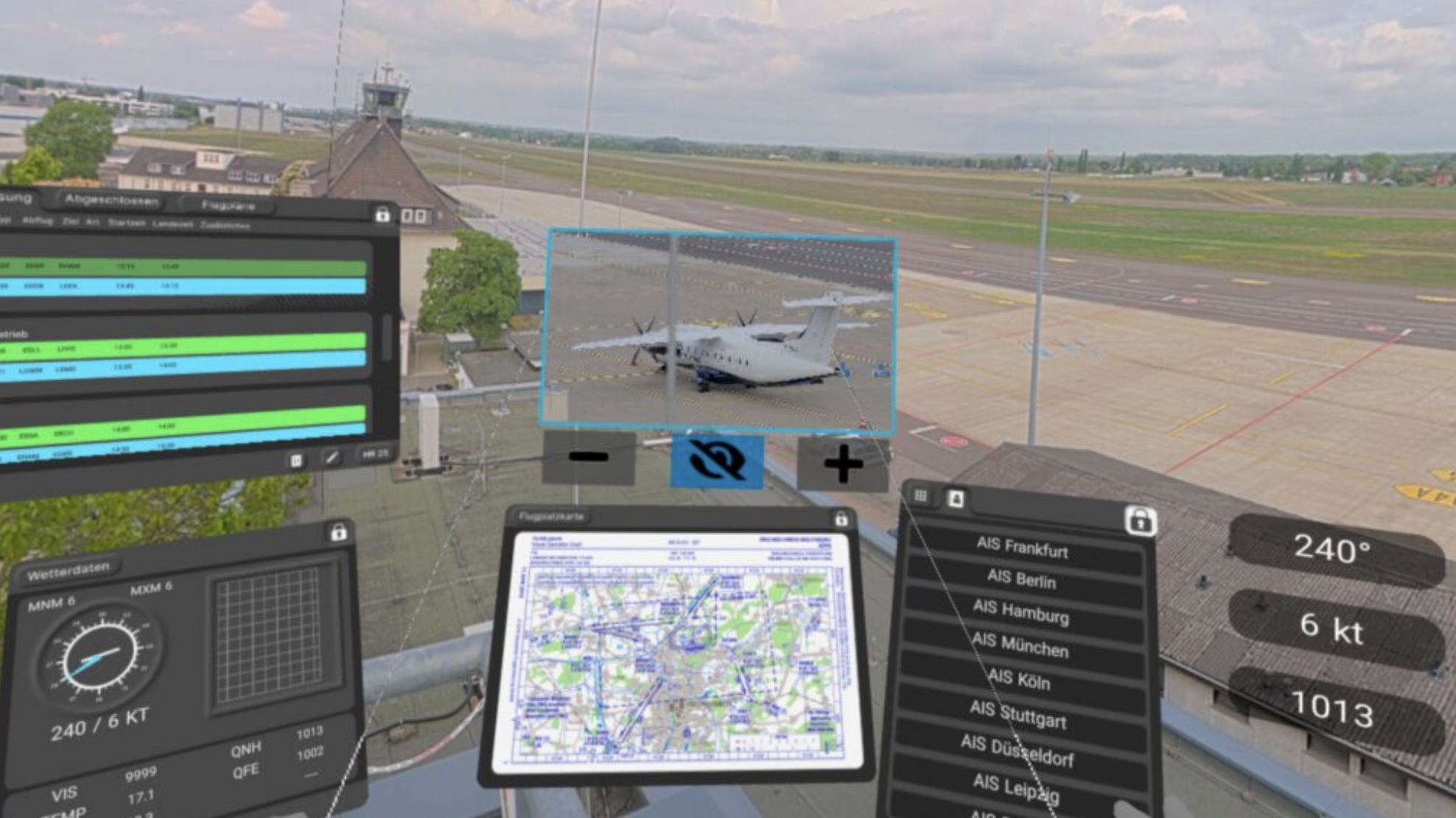
See the technology stack →VisionATS goes one step further and virtualises the working position itself. Panorama, detail camera, ambient audio, radio, flight data and weather are not distributed across physical monitors but placed inside one immersive environment that the operator carries with them.
What remains at the airport is a compact sensor installation. What remains at the operator's side is a headset and a network connection. Everything in between is software, and software can be copied, adjusted and moved in ways that a display wall cannot.
This is the direction that researchers at the DLR Institute of Flight Guidance have been exploring for several years under the name Virtual Tower. VisionATS translates that concept into a product for airport operators and service providers.
Inside the workspace
The virtual environment keeps operational information close to the outside view instead of scattering it across separate screens.
A live 360° panorama of runways, taxiways and apron areas forms the base layer of the workspace. The operator turns their head instead of switching a camera.
A pan, tilt and zoom camera replaces the binoculars. It can be pointed at a stand, a runway exit or an object that needs a closer look, without leaving the panorama.
Radio, weather, flight data, tracking and alerts sit as virtual panels around the view. They can be positioned per airport and shown only when they are relevant.
Call signs, stand designations and movement information can be drawn directly onto the outside view. The operator reads the situation in the picture instead of correlating it across separate displays. Research at DLR has shown labelling of this kind to be one of the clearer advantages of a virtual working position over a conventional tower window.
Software defined
Because the working position is software, a layout that has been agreed for one airport can be replicated for the next one, adjusted where local procedures differ, and rolled back if an evaluation says so. None of that requires new display hardware.
Research foundation
The virtual tower working position has been developed and evaluated at the DLR Institute of Flight Guidance, with results published in peer reviewed journals and conference proceedings since 2020. The list below is the reference material behind the concept. It documents research by DLR and does not constitute an endorsement of VisionATS.
Remote AFIS: Entwicklung und Validierung kostengünstiger Remote Tower-Konzepte für unkontrollierte FlugplätzeReuschling, F. and Jakobi, J. — DLRK 2020, Deutscher Luft- und Raumfahrtkongress.
Design and Implementation of a Virtual Workstation for a Remote AFISOHofmann, T., Jakobi, J., Biella, M., Blessmann, C., Reuschling, F. and Kamender, T. — HCI International 2020, Springer. doi:10.1007/978-3-030-59990-4_13
Remote AFIS: Development and Validation of low-cost Remote Tower Concepts for uncontrolled AerodromesReuschling, F. and Jakobi, J. — CEAS Aeronautical Journal, pp. 1067–1083, Springer. doi:10.1007/s13272-022-00613-2
Design Study for a Virtual Work Station for Aerodrome Air Traffic Service OfficersOpower, H. and Jakobi, J. — 34th EAAP Conference, Gibraltar. doi:10.1016/j.trpro.2022.12.012
Designing a low-cost Remote Tower SolutionReuschling, F. and Jakobi, J. — in: Virtual and Remote Control Tower, 2nd edition, Research Topics in Aerospace, Springer, pp. 543–566. doi:10.1007/978-3-030-93650-1_22
Prototyping and Evaluation of a Virtual Tower Work StationSchön, J., Thielmann, L., Nadobnik, A., Rambau, T. and Jakobi, J. — 35th EAAP Conference, Athens. doi:10.1016/j.trpro.2025.05.024
Virtual and Remote Control Tower, 2nd editionFürstenau, N., Jakobi, J. and Papenfuß, A. (eds.) — Research Topics in Aerospace, Springer. doi:10.1007/978-3-030-93650-1
Project site of the research: virtual-tower.de
A live demonstration explains more in twenty minutes than any description of it.